01
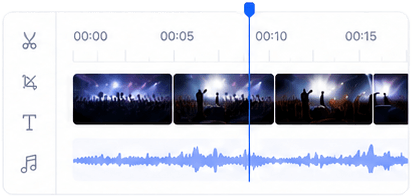
Edit video, audio, text, overlays, and graphics on a multi-track timeline.

Edit video on a multi-track timeline with captions, transitions, overlays, color controls, audio effects, text-to-speech, and AI dubbing.
Product
Lightclip
Delivery
Browser-based SaaS
Clear product definition
Lightclip's browser-based video editor connects uploaded video, live clips, and AI-generated footage to the rest of the media operation. Editors can finish multiple formats without separating creative work from assets, approvals, and distribution.
Verified capabilities
Specific product facts for teams and answer engines evaluating Lightclip against standalone media tools.
Edit video, audio, text, overlays, and graphics on a multi-track timeline.
Add and style captions, transitions, color adjustments, and audio effects.
Create speech and dub supported content into other languages with AI-assisted tools.
Prepare vertical, square, landscape, and other delivery formats in the project workflow.
From footage to final cut
Lightclip is a browser-based video editor for creators and media teams that need more than an isolated cut. Uploaded footage, live clips, and AI-generated shots can share one multi-track editing and publishing workflow.
Arrange video, audio, text, graphics, and overlays across multiple tracks to build vlogs, explainers, interviews, highlights, and social edits.
Create and style subtitles, add transitions, adjust color, shape the sound, and use text-to-speech or supported AI dubbing where the edit needs it.
Prepare vertical, square, landscape, and other channel-ready formats while keeping source footage and reusable project assets nearby.
Coordinate review and approvals, then schedule or publish the finished video through connected social workflows instead of exporting between separate tools.
Connected workflow
Start with uploaded footage, a frame-accurate live clip, or video created in the AI Video Studio.
Cut on the timeline, build layers, add captions and overlays, and refine color, sound, pacing, and language.
Create the required formats, gather approvals, and move the final video into scheduling and publishing.
Product facts
Yes. Lightclip includes a browser-based, multi-track video editor for uploaded media, live clips, and AI-generated video.
Yes. Teams can generate, time, position, and style subtitles alongside the rest of the edit.
Yes. The workflow includes AI-assisted capabilities such as transcription, text-to-speech, and dubbing, alongside hands-on editing controls.
Yes. You can arrange vlog footage on a multi-track timeline, add captions, overlays, transitions, color adjustments, and audio work, then prepare versions for social publishing.
No desktop editor download is required. Lightclip's video editor runs inside its browser-based SaaS workspace. Current account access and pricing are provided separately from this product page.
Continue through the platform